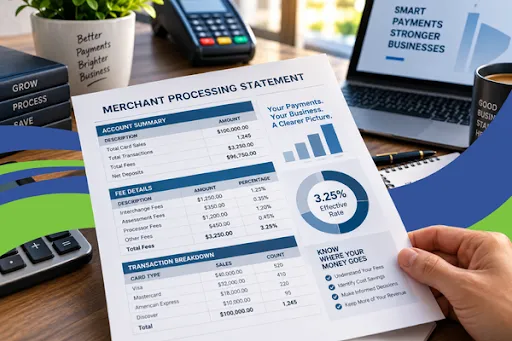
How to Read a Merchant Processing Statement: A Simple Guide for Business Owners
If your business accepts credit or debit cards, your merchant processing statement can tell you a lot about how much you're actually paying to accept those payments.
The problem is that processing statements are often filled with unfamiliar terms, multiple fees, transaction details, and pricing categories. It can be difficult to tell whether you're getting a competitive rate—or simply paying more than you realize.
The good news is that you don't need to understand every line of your statement to get a clear picture of your processing costs.
Start with a few key numbers: your total card sales, your total processing fees, and your effective processing rate.
What Is a Merchant Processing Statement?
A merchant processing statement is a monthly summary of the card transactions processed by your business and the fees associated with accepting those payments.
Depending on your processor and pricing structure, your statement may include information such as:
Total card sales
Number of transactions
Refunds and credits
Chargebacks
Interchange fees
Card network or assessment fees
Processor markup
Monthly or recurring fees
Batch or settlement fees
PCI-related fees
Other transaction or service fees
The format can vary significantly between payment processors, so two statements may look completely different even though they contain similar types of information.
That's why focusing on the overall cost is often more useful than looking at a single advertised rate.
Step 1: Find Your Total Card Sales
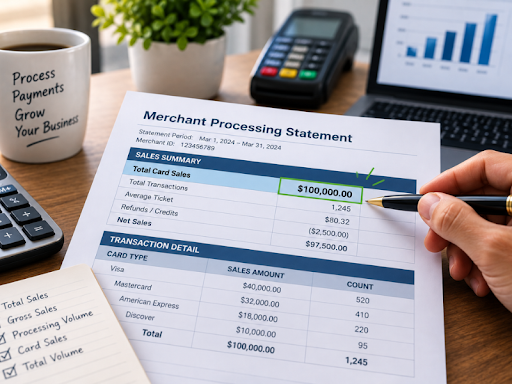
The first number to identify is how much your business processed during the statement period.
Look for terms such as:
Total Sales
Gross Sales
Processing Volume
Card Sales
Total Volume
For example, suppose your business processed:
$100,000 in card sales
This gives you the starting point for evaluating your processing costs.
Keep in mind that the exact sales figure you use should correspond to the fees you're evaluating. Refunds, credits, chargebacks, and other adjustments can affect how a statement reports its totals.
Step 2: Find Your Total Processing Fees
Next, determine how much you actually paid in processing-related fees during the same period.
Depending on your statement, these may appear under different categories or sections.
You may see:
Interchange charges
Assessment or network fees
Processor fees
Transaction fees
Monthly fees
Batch fees
Other service charges
Add the applicable processing costs together to determine your total fees for the period.
For example:
Total card sales: $100,000
Total processing fees: $3,250
Now you have the two numbers needed to calculate your effective rate.
Step 3: Calculate Your Effective Processing Rate
Your effective processing rate gives you a simple way to see what percentage of your card sales went toward processing fees.
The basic calculation is:
Effective Rate = Total Processing Fees ÷ Total Card Sales × 100
Using the example above:
$3,250 ÷ $100,000 × 100 = 3.25%
Your effective processing rate would therefore be:
3.25%
This can be a much more useful number for evaluating your overall processing costs than focusing only on an advertised transaction rate.
Why?
Because a quoted rate may represent only one component of your pricing. Your actual cost can also be affected by interchange, card-network fees, processor markup, per-transaction fees.
Why Your Advertised Rate May Not Be Your Actual Cost
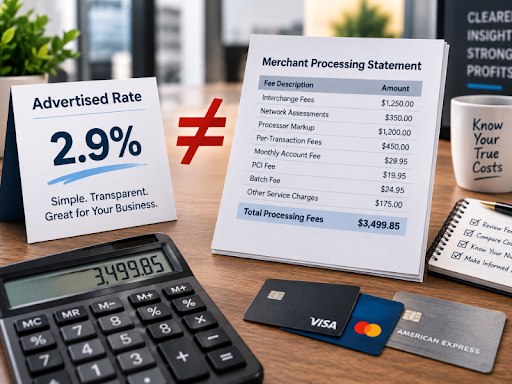
One of the most common mistakes merchants make is assuming the rate they were quoted is the same as what they're actually paying.
For example, a processor might advertise a percentage rate for certain transactions.
But your monthly statement could also include:
Per-transaction charges
Interchange costs
Network assessments
Monthly account fees
PCI fees
Batch fees
Other service charges
These costs can add up.
That's why looking at the total amount you paid compared with the amount you processed gives you a clearer picture of your overall processing expense.
Step 4: Look at Interchange Fees
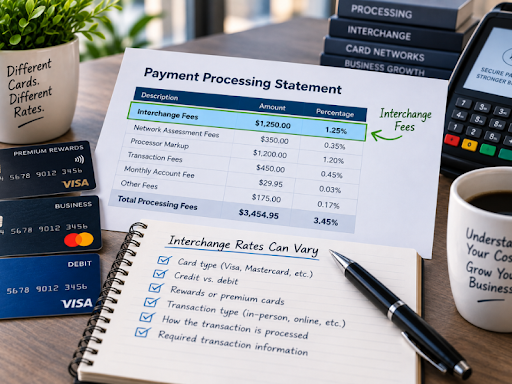
If your processor uses an interchange-plus or similar pricing structure, you'll typically see interchange-related charges on your statement.
Interchange is the portion of the card payment cost associated with the card-issuing bank and card network rules.
Interchange rates can vary based on factors such as:
Card type
Credit vs. debit
Rewards or premium cards
Transaction type
How the transaction is processed
Whether required transaction information is provided
This is one reason there isn't a single universal "credit card processing rate" that applies to every transaction.
A business processing mostly debit cards, for example, can have a very different cost structure from a business processing a large volume of premium rewards cards.
Step 5: Understand Card Network Fees
You may also see fees associated with the card networks, such as Visa or Mastercard.
These are generally separate from interchange and can appear on your statement under terms such as assessment fees, network fees, or similar terminology.
The exact terminology depends on your processor and statement format.
The important thing to understand is that your processing cost is usually made up of multiple components—not just one percentage.
Step 6: Check the Processor's Markup
If you're using an interchange-plus pricing model, your processor may add a markup on top of interchange and network costs.
The markup can include:
A percentage of the transaction
A per-transaction fee
Other account or service charges
This is an important area to review because the processor's markup is one part of your pricing structure that may be negotiable or vary significantly between providers.
Step 7: Look for Monthly and Other Fixed Fees
Don't stop at transaction-related charges.
Look through the statement for recurring or fixed fees, such as:
Monthly account fees
Statement fees
Payment gateway fees
Batch fees
PCI-related fees
Equipment fees
Service fees
A business with lower processing volume can be particularly affected by fixed monthly charges because those fees represent a larger percentage of its overall processing volume.
Step 8: Check for Chargebacks and Refunds
Your statement may also show chargebacks, refunds, and other adjustments.
These are important to review because they can affect your net results and may come with additional fees.
If your business experiences frequent chargebacks, it's worth looking beyond the processing rate alone and evaluating your overall payment acceptance costs.
Step 9: Compare Your Effective Rate Over Time
One month's statement gives you a snapshot.
Looking at several months can give you a much better understanding of your processing costs.
For example:
This can help you identify changes in your processing costs and determine whether your effective rate is relatively stable or fluctuating.
However, keep in mind that changes in your card mix, transaction types, sales volume, and other factors can affect your effective rate from month to month.
What Should You Look for on Your Merchant Statement?
When reviewing your statement, focus on these key questions:
1. How much did I process?
Find your total card sales or processing volume.
2. How much did I pay?
Calculate or identify your total processing-related fees.
3. What is my effective rate?
Use:
Total Processing Fees ÷ Total Card Sales × 100
4. What types of fees am I paying?
Separate transaction costs, interchange, network fees, processor markup, and fixed fees where possible.
5. Have my costs changed?
Compare your current statement with previous months.
6. Are there fees I don't understand?
If you see a charge you can't identify, ask your processor what it represents and whether it is required under your agreement.
A Simple Example
Let's say your business processes $100,000 in card payments during the month.
Your statement shows $3,250 in applicable processing fees.
Your effective rate is:
$3,250 ÷ $100,000 × 100 = 3.25%
That means your total processing costs were equivalent to 3.25% of your card sales for that statement period.
The effective rate doesn't necessarily tell you whether your pricing is good or bad by itself. Your business type, average transaction size, card mix, pricing model, and other factors all matter.
But it gives you an excellent starting point for understanding what you're actually paying.
Why Reading Your Merchant Statement Matters
Payment processing is an ongoing business expense.
Even a small difference in your effective processing cost can become significant as your sales volume increases.
For example, if a business processes $1 million in card payments annually, a difference of 0.25 percentage points represents approximately:
$1,000,000 × 0.25% = $2,500
That's why understanding your statement isn't just about finding confusing fees.
It's about knowing where your money is going and having the information you need to make informed decisions about your payment processing setup.
Don't Just Look at the Rate—Look at the Whole Statement
A processing statement can be confusing when you're looking at individual fees without understanding how they fit together.
Instead of asking only:
"What is my processing rate?"
A better question is:
"What is my total cost of accepting card payments?"
Start with your card sales and total processing fees. Then break down the statement to understand what's contributing to that cost.
Your effective rate provides a simple way to measure your overall processing expense, while the individual statement categories can help you understand why you're paying that amount.
Want Help Understanding Your Merchant Processing Statement?
You don't have to decipher every line of your statement on your own.
Send your merchant processing statement to ECI . We'll review your processing costs and help you understand where your money is going.
Don't want to decipher your statement yourself?
Send it to ECI. We'll analyze your processing costs and show you exactly where your money is going.
Understanding your statement is the first step toward understanding your payment processing costs.
